For years, it annoyed me to an unreasonable degree that I couldn’t use Git properly with TIA Portal.
And I don’t mean “it would be nice”. I mean the kind of irritation that appears exactly when:
- The machine is down
- The client is staring at you like you personally invented downtime
- And you’re trying to figure out what changed between two projects with the same name… that are definitely not the same project
Git for software? Beautiful.
Git for PLCs? Pure folklore.
The ritual was always the same:
- Project_Final
- Project_Final_2
- Project_Final_REAL
- Project_Final_REAL_NOW_FOR_SURE
And somewhere on a server nobody admits owning:
Backup_2024_11_03_reviewed_final_definitely.zipNo one deletes it. Ever. Because obviously that one might be the golden master.
TIA can export XML, sure.
But anyone who tried to put that XML into Git knows what happens next:
Git says everything changed.
You know nothing changed.
Nodes reordered. Attributes shuffled. GUIDs regenerated. Random “noise” that’s not a change, but Git can’t read your mind.
So Git becomes useless.
And we go back to ZIP files with dates like it’s 2009.
0) The real problem
The issue isn’t exporting. The issue is exporting for version control.
For Git to work, exports must be:
- Deterministic
- Ordered
- Reproducible
- Stable between runs
Native TIA XML is great for importing back into TIA.
It’s not great for diffing. It’s not great for reviews. And it’s definitely not great for your blood pressure.
1) The idea
That’s why I built TiaGitExporter.
Not a product. Not a platform. Not “AI-powered”. Just a tool to stop suffering first.
Export PLC artifacts into a Git-friendly XML structure.2) What it exports
Using TIA Openness, it can export:
- Function Blocks
- Functions
- UDTs
- Tag Tables
- PLC Types
Each artifact is written as its own file, inside a deterministic folder structure.
/ProjectName/
  /CPU_1/
    /Blocks/
      FB_Motor.xml
      FB_Valve.xml
    /Types/
      UDT_Motor.xml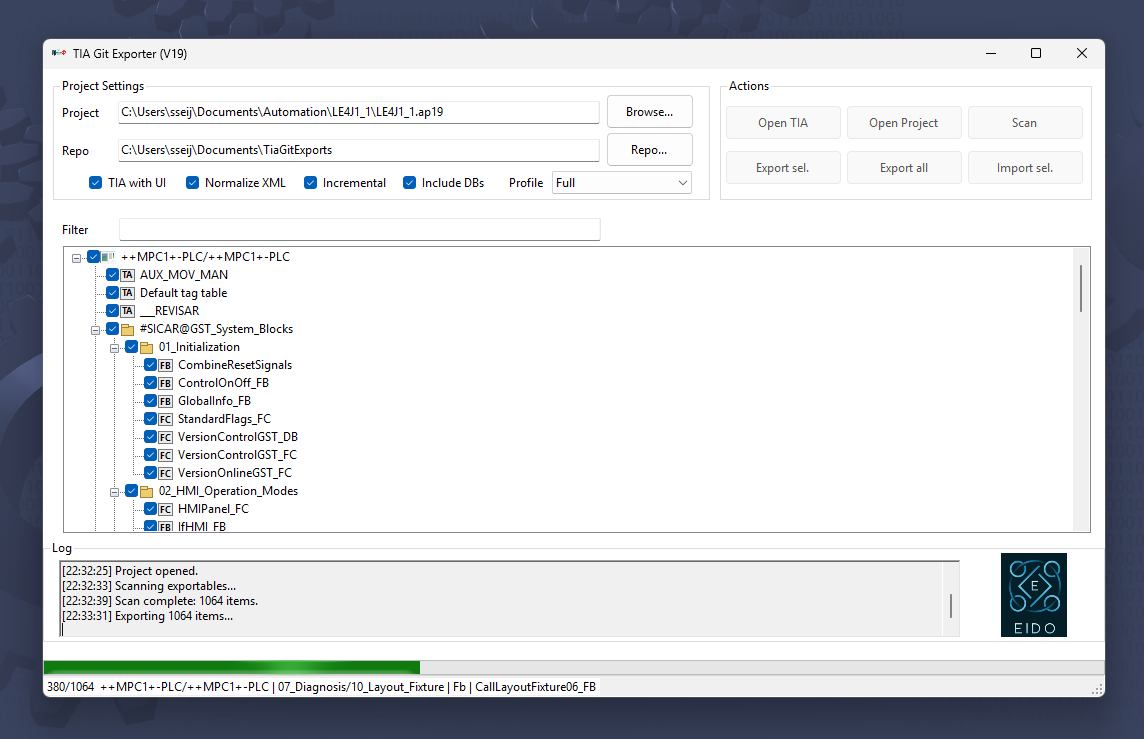
3) Determinism first
The trick isn’t “export to XML”. The trick is “export the same way, every time”.
Type → CPU → Group → NameIf nothing changed, Git should see nothing changed. Radical concept, I know.
4) XML normalization
Before writing files, the XML is normalized so diffs don’t turn into noise festivals:
- Consistent indentation
- Ordered attributes
- Noise removed
- UTF-8 without BOM
Result: smaller diffs, readable reviews, fewer “what the hell happened here?” moments.
5) Incremental export
Each file gets a SHA-256 hash. If it didn’t change, it doesn’t get rewritten.
- Cleaner commits
- Faster pipelines
- Actual incremental backups
6) Architecture
Two layers:
- Core: Openness, export/import, hashing, normalization
- UI: project selection and options
The UI stays dumb. The Core does the real work. Everyone’s happier.
7) Import
It can re-import XML too, which opens the door to:
- Restoring versions
- Syncing repositories
- Building/maintaining libraries
8) What it is NOT
It’s not a full-blown enterprise change-management suite.
Export → Version → CompareThat’s it. No magic. No ceremony.
9) Open-source
I released it because tools like this work better open than sold cheap.
Everyone’s setup is different, Openness changes by version, and the community inevitably makes it better (or at least tells you what’s broken).
10) Closing thought
It doesn’t change how you program PLCs.
It changes how you version their software.
And on big projects, that matters way more than it sounds.